Managers restock the ingredients needed for the venue's menu. Hire a manager, assign them to the venue, then set their role and working hours in Staff and Work Schedule.
Ingredients in your personal inventory are separate from venue stock used for cooking. Configure automatic restocking separately for each venue.
Set stock targets and budgets
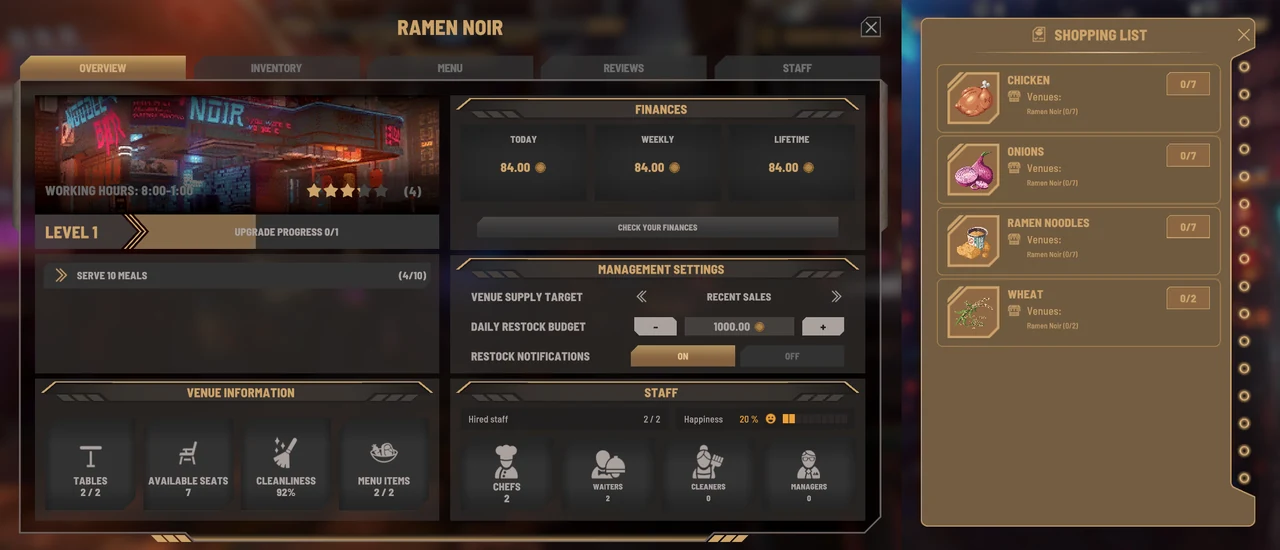
Open the relevant Venue Overview. If you own several venues, check that the correct name is displayed.
Open Venue Management Settings.
Choose Lean, Normal, Extra or Recent Sales.
Set the daily spending cap in Daily Restock Budget.
Reopen the screen and check that the selected stock target and budget have been saved.
Stock target
Restocking basis
Lean
Restock each required ingredient up to 2
Normal
Restock up to 5 each (default)
Extra
Restock up to 10 each
Recent Sales
Based on sales over the last 4 in-game hours, with a minimum of 2
These figures are target stock levels, not quantities bought on every restock. The shopping list also shows the ingredients to be purchased.
Use greenhouse stock
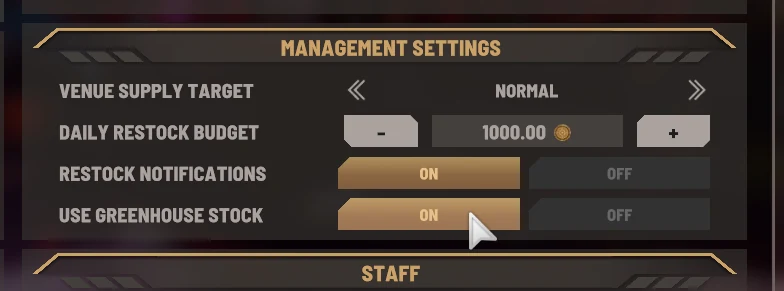
Greenhouses produce crops. Enable Use Greenhouse Stock to let a manager use harvested crops from greenhouse storage before buying from merchants.
Check that the harvested crops are in greenhouse storage.
Open Management Settings from the relevant Venue Overview.
Enable Use Greenhouse Stock.
After restocking, check both venue stock and the remaining greenhouse stock.